Start free
For salons, gyms, cafés and more

Your regulars.
Recurring revenue.

Offer customers recurring services and manage payments, bookings and usage in one app. Standard has no monthly fee. You pay SUBVY commission and separate Stripe fees from received payments.

Standard with no monthly feePayouts straight to your accountDirect payments to your Stripe account
How it works

How to offer your services by subscription

01

Set up your business profile

Enter your business details and complete payment setup with Stripe. Customers can subscribe once your profile is approved and you are ready to receive payments.

02

Create your first offer

Decide what customers receive, how much is included and what it costs. Choose billing periods, then set up bookings or walk-in visits to suit the service.

03

Invite your customers

People can find your approved profile on the Marketplace. Share your offer with existing customers or add the link to your website.

04

Track payments and visits

Subscriptions renew and payments are collected automatically. Track bookings and usage in SUBVY while Stripe sends payouts to your bank account.

Subscriptions in practice

SUBVY for your business

A salon needs the next appointment booked. A café has regular coffee orders. A studio has places to fill on classes. Choose your field to see how subscriptions fit.

Choose your business category
Yoga studio
Yoga studio

Take class bookings up to your capacity

In Standard and Pro

  • Create your class timetable for several weeks at once. Set the places available for each class and let subscribers book their own spot.
  • See individual bookings and group classes in the calendar, and filter classes and participants by service.

Extra tools with Pro

  • Assign classes and individual appointments to instructors according to their working hours.

This example shows your industry in practice. Shared tools and settings follow below.

What every business gets

Your offer, with day-to-day work in one place.

These tools are available whether you run a salon, café or studio. Paid extras are marked Pro. Both editions include web and mobile access.

Get paid for the period ahead

Customers pay at the start of their subscription period and subsequent payments are collected automatically. Active subscriptions give you a basis for planning revenue.

Invoices are issued in your business name and Stripe sends payouts to your bank account. No manual invoice writing or matching each payment.

Give customers a reason to return

Prepaid visits give customers a reason to come back. Share your offer with regulars; others can discover you on the Marketplace and map.

People who have paid you can leave reviews, and you can reply. Subscriptions help you build a regular customer base without guaranteeing its size.

See your revenue without building spreadsheets

Track revenue, the monthly and annual value of subscriptions and their usage in the app. Export payments for your accountant.

Pro adds advanced reports and accounting XML for ABRA Flexi, POHODA and Money S3. Send invoices and commission statements directly to a connected ABRA Flexi account.

Check in visits instead of taking payment

Scan a QR code with your phone to verify the subscription and record the visit. Prepaid services need no cash or card payment at the counter.

You pay Stripe fees for subscription payments separately from SUBVY commission. Serve customers without subscriptions as usual.

Messages and complaints without paperwork

Keep customer messages and notifications in the app, along with complaints and withdrawals whose deadlines SUBVY tracks.

Keep supporting information with the case and get help from SUBVY with bank payment disputes. Everyday arrangements and problems need not stay scattered across emails.

One account for your team and locations

With Pro, invite colleagues and give each access suited to their work. Assign bookings to staff with their own availability.

Manage multiple locations under one business. Web and mobile share the same data, whether you are in the office or on the floor.

You set the offer and price

A single service or a package, customer-selected quantities and intervals between visits. The industry example above is a starting point; build the offer to suit your business.

Subscription options
  • Combine one or more items in a plan. Let customers choose a quantity or interval between visits within your limits; they can adjust the interval later.
  • Offer payments every 1, 3, 6, 12 or 24 months and set the discount for each period. Customers can switch to an offered longer period by paying the difference.
  • Decide whether unused visits carry over to the next period or expire.
  • Enable subscription gift vouchers. With Pro, you can also offer discount codes.

Bookings that fit how you work

Walk-ins, appointments or group sessions? Choose the modes you need. Set availability, visit lengths and cancellation terms yourself.

Booking options
  • Individual appointments follow working hours, breaks and time off. Set the booking length per item. With Pro, each staff member has their own availability.
  • Set the booking notice, how far ahead customers can book, the cancellation deadline and manual approval. Create agreed regular appointments as a series.
  • Publish group timetables and capacity, and track attendance. A single service can combine group classes and individual visits.
  • Reschedule in the app or book for a customer who calls. A reminder goes out the day before. For individual appointments, enable a waiting list with alerts when a slot opens.

Every option described without a Pro label is also included in Standard, with no monthly fee. See payment commission and Pro prices below.

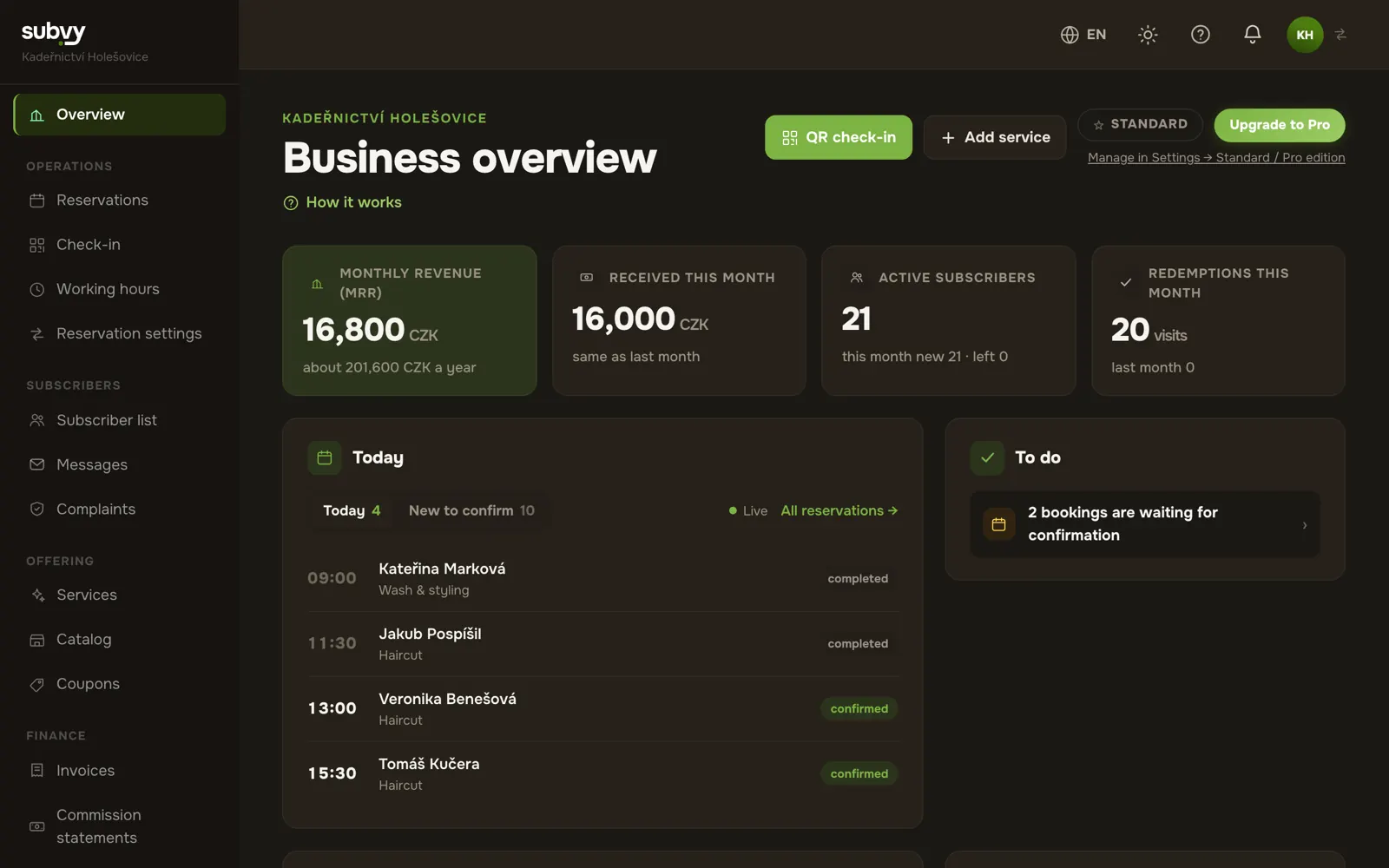
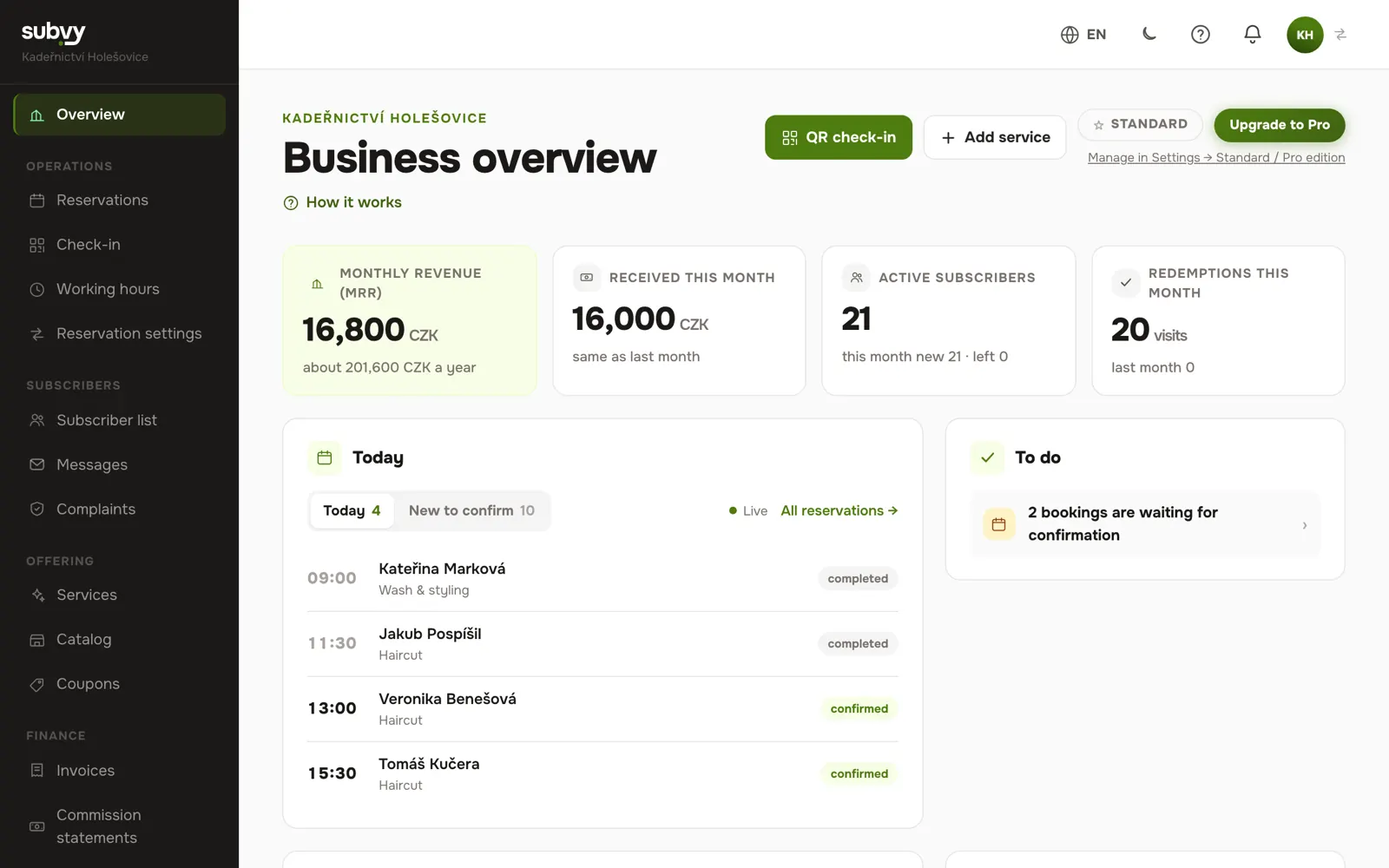
See what it looks like day to day.

The same account on the web and in the mobile app: at the computer in the office, on your phone in the shop.

One screen with monthly income, number of subscribers, today's appointments and what needs your attention.
Web on a computerOne screen with monthly income, number of subscribers, today's appointments and what needs your attention.
In the morning your phone tells you who is coming today and what subscriptions brought in this month.
Mobile appIn the morning your phone tells you who is coming today and what subscriptions brought in this month.

Screenshots of the app with sample data.

Commission on payments

Commission only on payments you receive.
It drops as your volume grows.

Commission based on payments received in the previous month. Subscriptions and gift vouchers count together, with each currency assessed separately.

You pay Stripe fees separately. Stripe pricing

Example: a 500.00 CZK subscription

Illustrative calculation for every commission band and an account in Czechia.

Starter

3.9% + 4.50 CZK

SUBVY commission
24.00 CZK
Stripe: card and Billing
≈ 17.50 CZK
Total fees
≈ 41.50 CZK
You keep
≈ 458.50 CZK

Growth

2.9% + 4 CZK

SUBVY commission
18.50 CZK
Stripe: card and Billing
≈ 17.50 CZK
Total fees
≈ 36.00 CZK
You keep
≈ 464.00 CZK

Business

1.9% + 3 CZK

SUBVY commission
12.50 CZK
Stripe: card and Billing
≈ 17.50 CZK
Total fees
≈ 30.00 CZK
You keep
≈ 470.00 CZK

Enterprise

0.9% + 2 CZK

SUBVY commission
6.50 CZK
Stripe: card and Billing
≈ 17.50 CZK
Total fees
≈ 24.00 CZK
You keep
≈ 476.00 CZK

The example assumes a standard EEA card. Other cards, additional Stripe services and VAT on its services may change the amount. Stripe rounding can slightly change the commission on the first subscription payment.

Commission and the displayed Pro prices are final, including VAT where applicable.

Businesses based in Czechia pay in CZK, businesses in Slovakia in EUR.
BandVolume / monthCommissionFixed fee / payment
Starter
0 – 19,999 CZK
3.9%
+ 4.50 CZK
Growth
20,000 – 99,999 CZK
2.9%
+ 4 CZK
Business
100,000 – 499,999 CZK
1.9%
+ 3 CZK
Enterprise
500,000 CZK +
0.9%
+ 2 CZK

No setup fee and no minimum turnover. If you sell nothing, you pay no commission.

Editions & features

Start free. Add Pro as you grow.

Standard has no monthly subscription fee and covers everyday operations: unlimited packages, bookings, payments and a public profile. You pay SUBVY commission and Stripe fees from received payments. Pro adds tools for teams and multiple locations.

Businesses based in Czechia pay in CZK, businesses in Slovakia in EUR.
Standard
Free
0 CZK per month, forever

1 user · 1 location · everything for everyday use

Start free →
For a growing business
Pro
490 CZK/mo
or 416.50 CZK/mo billed annually (save 15%)

Everything in Standard, plus:

✓ First month free✓3 staff members included, each additional one +90 CZK/mo.
Try Pro →
FeatureStandardPro
Subscriptions & payments
As many plans as you like, with one or more items, billed monthly up to every 2 years✓✓
Pausing a service: when you are fully booked, take it off the Marketplace while existing subscriptions continue✓✓
Visits on the customer's rhythm: in days, weeks or months (for example every 3 to 8 weeks), the customer chooses✓✓
Number chosen by the customer: for example 10 to 30 coffees a month, the customer picks how many and can change it later✓✓
Product catalog: kinds of coffee or breakfast with a unit price, the customer chooses one in the subscription and can change it later✓✓
Import catalog products from Excel; group imports and updates by code on the web✓✓
Import services and gift voucher offers from Excel on the website✓✓
Bulk changes to services, catalog, coupons and subscribers on the website, according to permissions✓✓
All services in one business currency: CZK or EUR✓✓
Automatic recurring card payments (Stripe)✓✓
Payouts straight to your bank account✓✓
Actual Stripe fees for payments and their summary✓✓
VAT handling and tax documents✓✓
Refunds to customers, for example after a complaint✓✓
Gift vouchers✓✓
Price changes with notice to customers and their consent when needed✓✓
Invoices to subscribers in your name and a monthly commission statement✓✓
Complaints and withdrawals in the app, we keep track of the deadlines✓✓
Help with payment disputes at the bank✓✓
Services in different currencies: choose CZK or EUR for each service–✓
Discount codes–✓
Bookings & redemptions
Group classes with schedules and shared service allowances✓✓
Online booking with opening hours, time off and appointment length per item✓✓
Booking calendar by month, week and day and a searchable list✓✓
Rescheduling by you or by the customer✓✓
Bookings on a customer's behalf (for example by phone), even outside opening hours✓✓
Recurring bookings✓✓
Bookings after the paid period, for example a regular slot with a monthly subscription✓✓
Waiting list: customers are notified when a slot frees up✓✓
Notes from customers and your internal notes on bookings✓✓
Breaks (even for a single day), minimum booking notice and slots every 15, 30 or 60 minutes✓✓
QR check-in from your phone✓✓
Booking confirmation and attendance tracking✓✓
Timely cancellations return the item, unused visits carry over to the next period✓✓
Bookings with a specific staff member, each with their own hours–✓
Marketplace & public profile
Public profile on the Marketplace and on the map✓✓
Three poster and image designs with your business QR code✓✓
Logo, photo gallery and business description✓✓
Service templates for your field✓✓
Profile and services in Czech, Slovak and English, the app in all three languages✓✓
Customer reviews and your replies to them✓✓
Three additional artwork designs and text, colour and logo editor–✓
Larger photo gallery: up to 15 photos (5 in Standard)–✓
Priority ranking among recommended on the Marketplace–✓
“Pro” badge on the Marketplace–✓
Communication & marketing
Messages with customers✓✓
Notifications in the app, by email and on your phone✓✓
Bulk messages to customers–✓
Morning summary by email: today's bookings, yesterday's payments and what is waiting for you–✓
Insights & reports
Overview of recurring monthly and annual revenue, subscribers, sales and usage✓✓
Detailed reports by service, city and how long customers stay–✓
Reports by staff member and city–✓
Data export
Invoices to Excel (XLSX) and CSV for your accountant or for import into accounting software✓✓
Offers, subscribers and payouts to Excel and CSV on the website✓✓
Bookings to your computer or phone calendar and to a spreadsheet (CSV)✓✓
Monthly commission statement in CSV and ISDOC✓✓
Invoices, credit notes and commission statements to accounting: XML for ABRA Flexi, POHODA and Money S3, direct transfer to ABRA Flexi–✓
Report export to CSV and regularly by email–✓
Reports and payment overview as PDF–✓
Calendar subscriptions and Google/Outlook connections–✓
Team & locations
Two-step verification and an overview of signed-in devices✓✓
Automatic protection against overwriting another user’s changes✓✓
Several businesses under one login, each can be deleted separately✓✓
Multiple locations (branches)–✓
Team and permissions: who can see and do what in the account–✓
Review replies by an authorised team member–✓
Permission templates: Staff, Reception, Accountant, Manager–✓
Restricting team members to a chosen branch–✓
Staff (colleagues who serve your customers)–✓

Pro is an optional monthly fee for extra features. The commission on payments is the same for both editions (see above).

FAQ

Frequently asked questions.

Will my customers actually want a subscription?+
It appeals most to people who already come regularly: they save money and no longer pay at the counter. Start with one good-value plan for them, offer it in person or send them a link to your profile, then adjust your offer based on what they buy.
When and where do I get my money?+
Payments go directly to your own Stripe account. Stripe deducts its fees and SUBVY commission and pays the balance to your bank according to the schedule you set in Stripe. You have access to the full Stripe Dashboard, including Stripe fee details.
Do I have to pay upfront or a monthly flat fee?+
Registration and Standard have no monthly SUBVY fee. You pay SUBVY commission only on payments received and pay Stripe fees separately under its pricing. Optional Pro has its own price for additional features and a free first month.
What is free and what does Pro add?+
The Standard edition is free forever and covers everyday operations: as many plans as you like, bookings, QR check-in, payments, a public profile and reviews. The Pro edition (an optional monthly fee, first month free) adds multiple locations, a team with permissions, bookings with specific staff, discount codes, services in different currencies, detailed reports, bulk messages and a connection to the ABRA Flexi accounting software. The commission on payments is the same for both editions: Pro is a flat fee for extra features, not a higher percentage.
What if a customer wants to cancel their subscription?+
Customers can turn off the next renewal at any time. The subscription continues until the paid period ends; stopping renewal does not itself trigger a refund. Refunds are handled separately, for example for consumer withdrawal within 14 days or an upheld complaint. The subscriber list shows whose subscription is ending and when.
Can I have multiple plans at once?+
Yes. You can have as many plans as you like, say a haircut only, a haircut with colouring and a yearly plan for loyal customers. Each has its own rules: what it includes, how often it can be used and at what price. We recommend starting with two or three and adjusting them based on what customers buy.
What if I don't want a booking system?+
Bookings are optional, and the setup wizard pre-selects them based on your trade: salons and beauty studios usually have them on, cafés and gyms do not. Without bookings, customers simply come in and show a QR code at the counter, which you scan with your phone (or type in the short code below it). You can turn bookings on or off at any time in your settings.
What if a customer doesn't show up?+
The visit is deducted from their subscription as soon as they book. If they cancel in time (you set the deadline, for example 24 hours ahead), they get the item back. If they cancel late or don't turn up, the item is used up, so the time you kept for them is still paid for.
Do I need a computer, or is a phone enough?+
Use whatever suits you. Services, bookings, check-ins, reports and invoices all work on the web and in the mobile app, with the same account. Your customers can likewise choose between the web and the app.
What are the minimum requirements?+
All you need is a company ID (sole trader or company) based in Czechia or Slovakia and a bank account for payouts. You don't submit any documents when you sign up: we check your business and approve your profile within 2 business days. Stripe then verifies your identity and bank account when you set up payouts.

More answers and step-by-step guides are in the help center.

Regular customers start with a single plan.

Signing up is free and there's no commitment. You only pay a commission once a customer pays you.