Start free
For regular customers

Favourite places.
In one app.

Bookings, a QR card, messages with the business, payments and documents in one place, on the web and on your phone. And where you go regularly, a subscription costs you less.

Everything for your visits in one placeCheaper than paying per visitCancel the next renewal anytimeSecure payments via Stripe
How it works

From choosing a service to your next visit.

1

Choose a business

Browse services near you on the Marketplace. Check the price, number of visits or collections and the terms of each offer.

2

Choose a plan and pay

Choose a plan and an available billing period. Pay by card, which will also be used for automatic renewal payments.

3

Book a place or drop in

If the service requires a booking, reserve an available appointment or class place. Show the QR code from the app when you arrive.

Services that fit you

Which services would you use regularly?

Start with a service you keep coming back to. See how a subscription could help, then browse businesses and their offers on the Marketplace.

Choose a service you are interested in
Hair salon
Hair salon

Book your next haircut without calling

  • Choose an available appointment in the app if your salon offers online bookings.
  • If your salon offers a choice of visit frequency, choose from the available intervals between haircuts. You will see your subscription price before paying.

This is an example. Check the business offer for specific contents, prices and available options.

Across your subscriptions

Different places. One place to keep track.

The services differ, but you manage appointments, conversations and payments from businesses on SUBVY in one account, on the web and in the mobile app.

One calendar for your appointments

Keep bookings across businesses in one calendar and add them to your own. Where supported, choose a staff member, arrange a recurring slot or reschedule. Individual appointments may offer a waiting list. Get a reminder the day before your visit.

Your pass and remaining visits on your phone

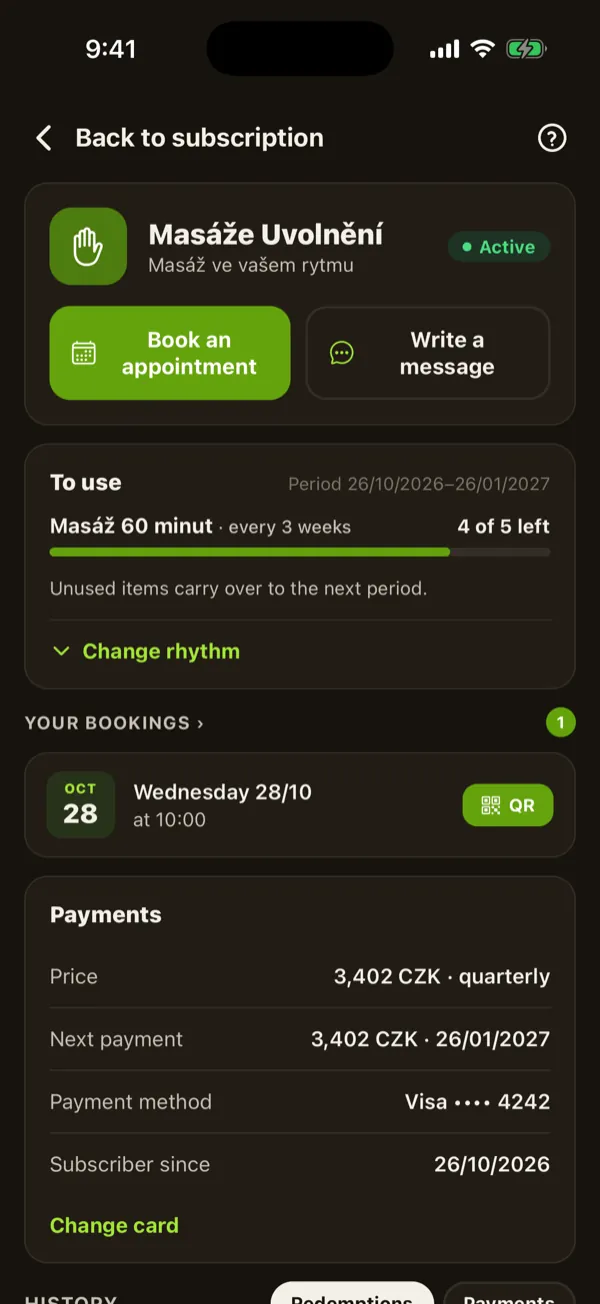
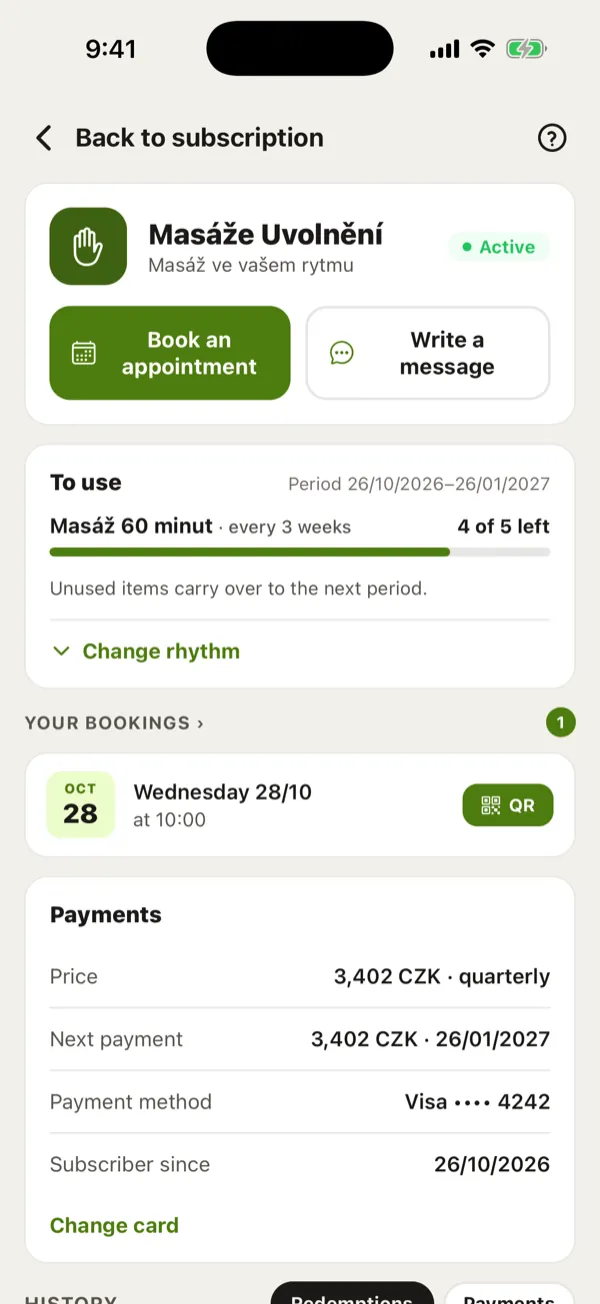
Each subscription shows your used and remaining visits and next payment date. Show a QR code on arrival to verify and record the visit, without looking for a paper pass.

Messages and documents with your subscription

Message the business in the app and find the reply alongside your subscription. The same account holds your invoices and payment confirmations. Add your business billing details when buying for work.

Find businesses by location and customer experience

Browse the list or map. Only customers who have paid the business can leave a review. You can explore offers before creating an account.

This is what it looks like.

On the web on your computer and in the mobile app, with one account and the same data.

Your next appointment with directions on the map and upcoming bookings, all on the first screen.
Mobile appYour next appointment with directions on the map and upcoming bookings, all on the first screen.
Right after signing in you see your next appointment, what's coming up and when the next payment is due.
Web on a computerRight after signing in you see your next appointment, what's coming up and when the next payment is due.

Screenshots of the app with sample data.

Benefits and terms

A subscription that fits, with clear terms.

Know what you pay, when you can use your services and how to stop the next payment.

Know the price upfront

Each plan shows its price and discount compared with individual visits. The business sets the discount. Paying ahead helps it plan its work.

Stripe processes payments, with 3D Secure verification when needed. SUBVY does not store your card number.

Choose a plan that fits

Pick from the available billing periods. Where the business allows it, choose a visit count or interval between visits and adjust it later in the app.

Switch to an offered longer period by paying the difference, with its visit allowance available immediately. A separate change to visit count or frequency takes effect from the next period.

Use your visits during the paid period

Your full allowance is available from the start. For example, spread 12 prepaid visits over the year. Appointments and class places still depend on availability.

The business decides whether unused visits carry over to the next period. Check the terms before subscribing.

Stay in control of renewal

Subscriptions renew automatically. Turn off the next renewal at any time without a cancellation fee; your paid period continues to its end.

A price increase cannot change a period already paid for. You get advance notice, at least 30 days before it takes effect, and larger increases require your approval.

Handle withdrawal and complaints in the app

As a consumer, you can withdraw from a subscription within 14 days and receive a refund for the services you have not used.

If a service falls short, submit a complaint. The business has 5 working days to respond; if it does not, SUBVY takes over the case.

Give a favourite service as a gift

Where a business offers gift vouchers, you can buy a subscription as a gift without creating your own account.

The recipient gets the voucher by email immediately or on a date you choose. Pick the business offer and delivery date.

Comparison

A subscription or individual visits?

A subscription suits places you want to return to. With individual purchases, you decide each time. Offers and booking options depend on the business.

TopicSubscription through SUBVYIndividual purchases
Price
✓See the plan price and discount before subscribing.
Each visit is priced according to the business's rates and offers.
Payment and check-in
✓Pay ahead by card, with automatic renewal. The QR code is for check-in.
Pay for each visit using a method the business accepts.
Appointments and classes
✓Book from your subscription within the offer and capacity, with appointments in one calendar.
Book as the business allows: online, by phone or in person.
Visit allowance
✓Use the full allowance during the paid period, subject to service terms.
Buy individual visits as you need them.
Messages
✓Keep conversations with different businesses alongside their subscriptions in one account.
Use the contact channels each business offers.
Documents
✓SUBVY invoices and payment confirmations in one place.
A paper or digital receipt from the business.
Price changes
✓For a future period with advance notice; larger increases need your approval.
Your next purchase follows the business's current offer.
Next purchase
✓Turn off automatic renewal. The paid period runs to its end without a cancellation fee.
Decide on each visit and purchase separately.
FAQ

Frequently asked questions.

How do I pay?+
You enter your card in a secure Stripe form with your first order and later payments are charged automatically. You can change the card anytime in Settings → Payment methods. Your card number is never stored on our servers.
When am I charged?+
The first payment happens immediately when you activate the subscription. Each later one is charged automatically on the renewal date, according to the interval you chose (monthly up to every two years). You'll always see the exact date in your subscription details.
Can I change how often I come or pay?+
Where the business allows a choice of visit count or frequency, adjust it in your subscription details. The change takes effect from the next period. You can switch to an offered longer billing period by paying the difference, but not to a shorter one. Order a different service separately and turn off renewal of the current one if needed.
How do I cancel a subscription?+
In your subscription details, click “Cancel subscription”. It stops renewing but stays active until the end of the paid period, so you have time to use everything. Cancelling costs nothing.
What if I don't use my subscription?+
It depends on the business. By default, unused visits carry over to the next period and you can use them later for as long as the subscription lasts. A business can switch this off, in which case unused visits expire at the end of the paid period. If a business offers carry-over, you'll see it on its profile.
What if I can't make my appointment?+
Cancel or reschedule it in the app. If you do it before the deadline the business has set (for example 24 hours ahead), you get the visit back and can pick another time. After the deadline the visit is used up, because the business kept the time for you.
Can a business raise my price?+
A paid period never changes. The business must announce a price increase in advance, it applies from the renewal after 30 days at the earliest, and you must approve a bigger increase. If you disagree, the subscription ends with the paid period and you pay nothing more.
What if I'm not happy with the service?+
Write to the business right in the app, or file a complaint with your subscription. The business must respond within 5 working days, otherwise SUBVY takes it over. It is resolved within 30 days at the latest.
Are there any extra fees for using SUBVY?+
No. You pay only the subscription price shown in the business offer. Subscribers are not charged extra for registration or using SUBVY.
Do I have to download an app?+
No. Subscriptions, bookings, the QR code and messages all work on the web, on a computer or in your phone's browser. If you prefer, you can use the mobile app with the same account and the same data.
Can I give a subscription as a gift?+
With providers that offer gift vouchers, you can buy a subscription as a gift, even without your own account. The recipient gets a unique code to activate it and can continue with their own card. You'll see on a provider's profile whether they offer vouchers.

More answers and step-by-step guides are in the help center.

Where do you go most often?

Check whether they already offer a subscription. Signing up is free and there's no commitment.

Find places near you →